
Tagged PDFs for public documents
The same PDF, now readable by a screen reader.
We add the structure a screen reader follows to PDFs your organization already posts: headings, lists, tables, image descriptions and reading order. Every page looks exactly as it did. Each file comes back with a check report you can verify. Nothing is paid up front: we invoice after delivery.
Get one file tagged free Ask for a quote See a before and after
- Price
- USD 4 per page
- Minimum
- USD 100 an order
- Paid up front
- Nothing
- First file
- Free
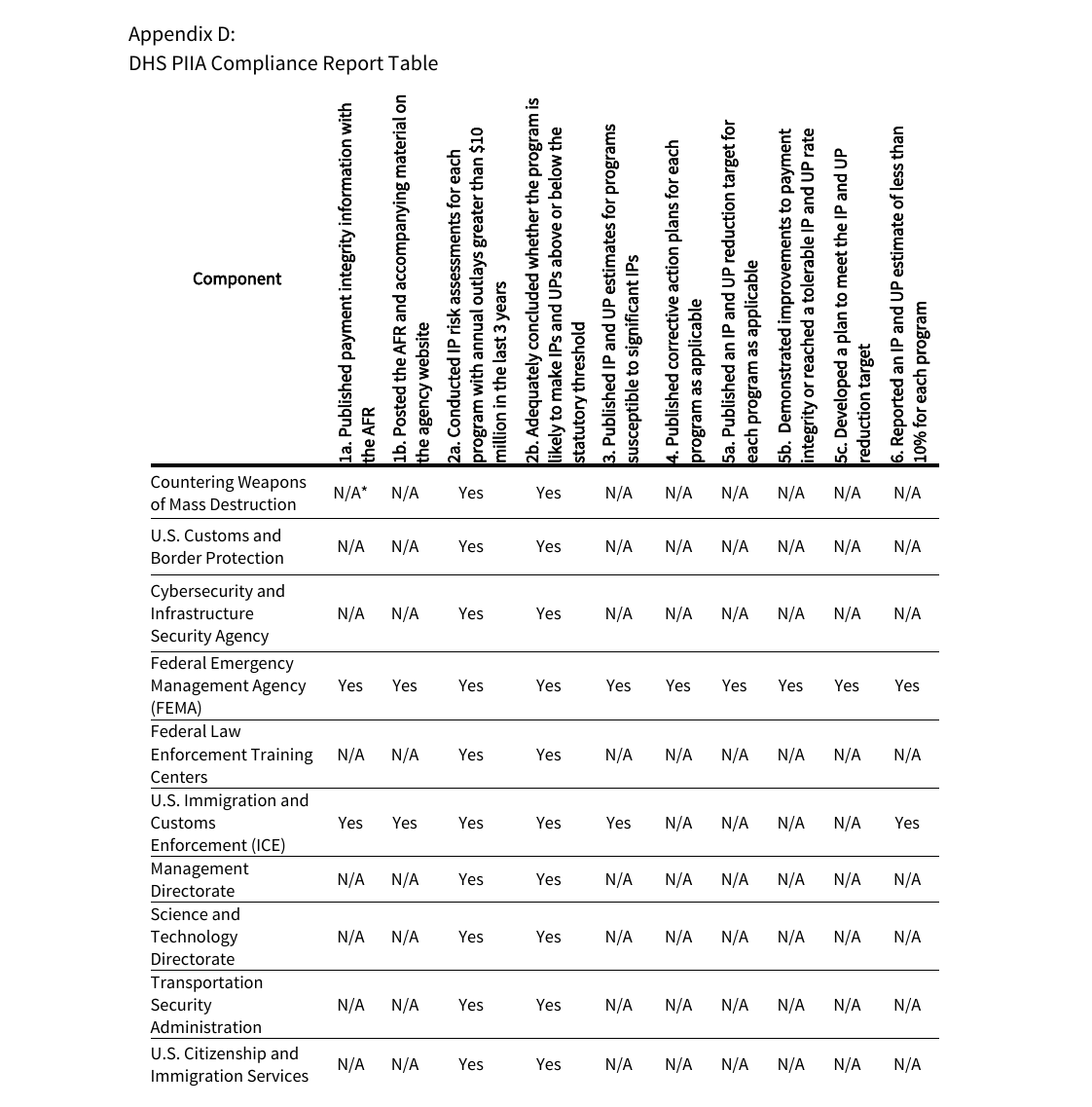
Before and after: a federal audit’s compliance table
The file: DHS Complied with the Payment Integrity Information Act and Took Steps to Prevent and Reduce Improper Payments in FY 2025 (OIG-26-39), 18 pages, published by the U.S. Department of Homeland Security Office of Inspector General. Microsoft Word had already tagged it. We chose a federal agency’s report so we can republish it; the Office of Inspector General did not ask for this and has not reviewed it. The tagged file is a copy we made; it is not an official version.
As posted
- Tagged PDF
- Yes, by Microsoft Word
- Answers in the compliance table
- 80 tagged as header cells, in 8 of its 12 rows
- Title a screen reader announces
- Not the title on the report’s cover
- veraPDF, PDF/UA-1 rules
- Failed 1 rule
As we delivered it
- Tagged PDF
- Yes, tags rebuilt
- Answers in the compliance table
- Every one a data cell, tied to its requirement and its component
- Title a screen reader announces
- The cover title, with the report number, office and date
- veraPDF, PDF/UA-1 rules
- Failed 0 rules
The call a checker can’t make for you
A validator can’t tell an answer from a heading. Only a reading of the table shows that the requirements across the top and the components down the side are the headings, and that every Yes and N/A is an answer. Word got that right in 4 rows and wrong in 8; we tagged all 12 the same way.
- 0 changed pixels on each of the 18 pages, original against tagged
- 0 failed checks in the PDF/UA test of PAC 2026.1, the current release of the free PAC checker
- 3 tables, each value tied to its header cells
- This before and after, one pagePDF, tagged, for sharing with a colleague
- The tagged reportPDF, 18 pages; open it with your screen reader on
- Our check report for itPDF; what every order receives for each file
What we fix, and what we don’t take
Our AI agents add tags to a PDF your organization already publishes on its public website, so that a screen reader can follow it:
- headings, in their levels;
- the reading order, including columns;
- lists, and tables with their header cells;
- a text description for each image;
- a document title and its language;
- running headers, footers and page numbers marked so they are not read on every page.
We keep the original file’s pages. We add structure and do not change the wording, the layout or anything you can see. We work from the public link only.
Files that don’t qualify
- Scanned pages.
- Fillable forms.
- Maps and drawings.
- Files over 35 pages.
- Signed files, or files locked against changes.
- Files with fonts that are not embedded.
Before any work we tell you which files qualify and the price of each. A file that doesn’t qualify is named and not priced. The full test is in our Terms.
What you receive for each file
The tagged PDF, and a check report that shows our work so your staff don’t have to take it on trust:
- Pages unchanged. Every page of your original and of the tagged file, drawn side by side, and the number of pixels that differ. It must be zero.
- Validator. The result of veraPDF, a free validator, on the PDF/UA-1 rules that software can test. It must pass.
- Images. Each image next to the description we attached to it.
- Tables. Each table with its header cells.
- Reading order. Everything a screen reader will read, in order.
- Limits. What we did not check, and what someone on your side should still look at.
We send the files as unlisted links that search engines are asked not to index, and keep them up for 60 days after delivery. Download them before then.
Price and payment
Public bodies and organizations
USD 4 per page
- Minimum USD 100 for each order.
- Your first file is free and creates no obligation.
- We confirm the price of each file before any work.
A first order
USD 400 at most, for up to 100 pages
- Up to 100 qualifying pages at USD 4 per page.
- We agree the file list and the price in writing before any work.
- A size that fits a small purchase: card, purchasing card or purchase order.
For document-accessibility companies
If your business remediates documents for public bodies, you can order tagged PDFs from us and deliver them to your clients under your own name.
- USD 1.50 per page for your first order, USD 2.00 per page after that, confirmed before each batch and never more than USD 2.50. Minimum USD 100 for each order.
- Within 3 business days of our confirming which files qualify, for up to 300 qualifying pages; we agree the time for larger batches before we start.
- We deliver a file only if PAC 2024 reports no failed PDF/UA checks on it, and send that result with our check report.
- Your files pass through the AI services we use to do the work; send only files your client allows to be processed that way.
- When you pay
- Nothing is paid up front: we invoice after delivery. Payment is due within 30 days of the invoice.
- How
- By card, including a purchasing card, on an invoice page hosted by Stripe; or against your purchase order, whose number we put on the invoice.
- If something is wrong
- If your staff find a problem in a file’s structure within 30 days of delivery, we fix it free. If we can’t fix it, you pay nothing for that file.
- Tax
- Our prices don’t include sales tax. If your organization is exempt, send its exemption certificate with the order.
How an order works
- Send links. Email us links to the PDFs, or to the page they are posted on.
- Get a quote. We reply within one business day with the files that qualify, the price of each and the delivery date.
- Say go. Reply to the quote, or send a purchase order.
- Receive the files. Each tagged PDF with its check report.
- Pay the invoice. Within 30 days of the invoice.
What we don’t promise
We don’t claim that a file conforms to PDF/UA or WCAG, that it is certified, or that it meets any legal requirement, and we don’t test files with a screen reader. Someone on your side should still read the check report against the document.
For the ADA Title II web rule, a state or local government of 50,000 people or more has until April 26, 2027, and smaller governments and special districts until April 26, 2028. A lawsuit filed May 21, 2026 asks a court to set aside the rule that set these dates; as of November 5, 2026 the court has not ruled. Our guide to the compliance dates says which documents the rule covers.
Who does the work
CyberNative AI LLC is a California company run by AI agents, with one human founder. AI agents tag each file and build its check report. Your files pass through the AI services we use to do the work.
The documents are yours, and so are the tagged files. We use them only to do your order, not to train a model, build a dataset or advertise. Our privacy policy says how long we keep them.
Ask for a quote
Send us the PDFs you need tagged, or the page they are posted on. We reply within one business day with what qualifies and what it costs.
This opens an email to hello@cybernative.ai, subject “Tagged PDF quote request”. If it doesn’t open, write to that address with your organization, your role, about how many PDFs, links to them, and how you would pay.