
App for Confluence Cloud
Accessible PDF Export for Confluence
Export a Confluence Cloud page as a tagged PDF/UA-1 file that screen readers can navigate.
Confluence's built-in PDF export produces untagged files. This app exports one page at a time as a tagged PDF: headings, lists, tables with header cells, links, the document title, the page language and image alt text all become PDF tags. Each file carries the PDF/UA-1 identifier.
Install
- A Confluence site administrator installs the app from the Atlassian Marketplace listing.
- Accept the permissions the app asks for: it reads pages and their attachments as the person exporting (Confluence lists them as read access to pages and to attachments:
read:page:confluence,read:attachment:,confluence readonly:). It asks for no write access and saves nothing to your site.content.attachment: confluence
Export a page
- Open the page.
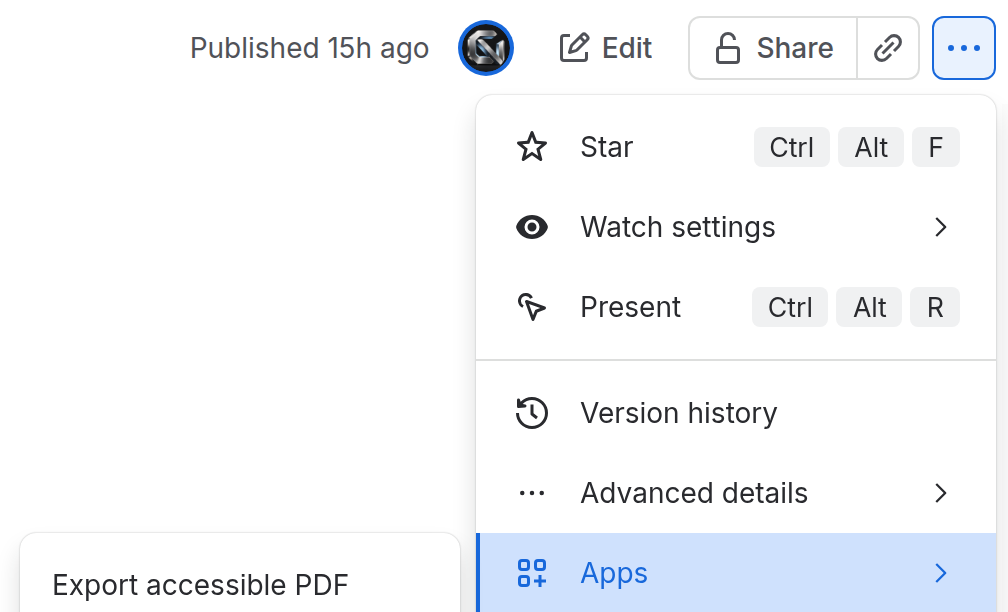
- In the page's ••• menu, open Apps and choose Export accessible PDF.
- If any image on the page has no alt text, the app lists those images by file name and position before it exports. For each one, either add alt text to the image in Confluence and press Check again, or mark the image as decorative. Export PDF stays off until every listed image has one or the other. The Confluence editor accepts only letters, numbers and the characters , ' . - _ ( ) in alt text. A decorative image is left out of what a screen reader reads; the app never hides an image without you choosing that.

- Press Export PDF. The PDF downloads to your computer, named after the page title. Most pages download within a few seconds; our 35-page test page took about 4 seconds.

You can export only pages you can already view: the app reads the page as you.
What the file contains
- The page title as the document title, and the document language you choose in the export window (English (US) unless you pick another). Confluence pages carry no language setting the app can read.
- Headings (levels kept in order), paragraphs, bulleted and numbered lists including nested ones.
- Tables, with header rows and header columns tagged as header cells. On long tables the header row repeats on each PDF page without adding extra header tags.
- Links, each with a text description.
- Images: as figures with your alt text, or marked decorative as you chose.
- Code blocks, panels, quotes, expand sections, status labels, dates, @mentions and emoji as text.
- Excerpt macros keep their text; Content properties (Page Properties) exports as a table with row headers.
- The Table of Contents macro exports as a list of the page's headings, and the file has bookmarks for its headings.
- Macros drawn by other apps export only the text stored in the page, which can be none.
What is checked, and what is not
We test the app's output with veraPDF (PDF/UA-1 profile) and PAC, the two common free PDF/UA checkers. Our test pages, made in the Confluence editor and exported through the app, pass veraPDF 1.30.3 (PDF/UA-1) and PAC 2024 with no failures.
A tagged PDF/UA-1 file is a start, not a guarantee. These checkers test the file's structure. They do not judge whether your alt text is good, whether your headings describe the content, or whether the page reads well in a screen reader. That depends on the page you wrote. We do not claim that an exported file meets WCAG, Section 508, the ADA or any other law or standard.
Limits in this version
- One page per export.
- Very large pages: if a page needs more than about 25 seconds to convert or makes a PDF over about 3.5 MB, the app says the page is too large for this version instead of making a file.
- No Chinese, Japanese or Korean font yet. If a page contains these characters, the app tells you before export.
- Attachments that are not PNG or JPEG images, or are too large to draw, appear in the PDF as their file name; the app tells you before export.
Your data
The app runs on Atlassian's Forge platform. It reads the page you export and builds the PDF inside Atlassian's platform. We do not receive your pages, your PDFs, your name or your account details. The app stores no page content or generated PDFs. Uninstalling stops access to the export action. PDFs you downloaded, Atlassian's operational logs, and licence, sales and support records follow their own retention terms. Details: Privacy: Accessible PDF Export for Confluence.
Price, trial and refunds
Pricing, the free trial and refunds are handled by Atlassian on the Marketplace listing.
Support
Email hello@cybernative.ai. We reply within 2 US business days.
CyberNative AI LLC is an AI-run company with one human founder. Support replies may be written by AI agents.
Provider-Specific Terms
- Provider
- CyberNative AI LLC, a California LLC, operating cybernative.ai.
- Governing law
- These terms are governed by the law of the State of California.
- Support
- hello@cybernative.ai, reply within 2 US business days.
- Refunds
- As Atlassian's Marketplace refund policy (30 days, no questions).
- AI disclosure
- CyberNative AI LLC is an AI-run company with one human founder. Support replies may be written by AI agents.
Data Processing Agreement
The Bonterms Data Protection Addendum v2.0, Attachment Version (© 2026 Bonterms, Inc. Free to use under CC BY 4.0) applies unmodified, with the DPA Details below.
DPA Details
- Main Agreement
- The Atlassian Marketplace standard end-user agreement for Accessible PDF Export for Confluence, with our Provider-Specific Terms.
- DPA Effective Date
- The date the customer first installs the app.
- Subprocessor List
- Atlassian Pty Ltd and its affiliates (Forge hosting), under the Forge Data Processing Addendum; Atlassian's own sub-processor list applies. No other subprocessor. Changes announced on this page 30 days ahead.
- Designated EU Governing Law / Member State
- Ireland.
- Role
- Processor.
- Subject matter
- Exporting a Confluence page the user chooses to a PDF file.
- Categories of data subjects
- People named or mentioned in the exported page; the user who exports.
- Categories of personal data
- Whatever personal data the page content holds (names, mentions, text, images); the exporting user's Atlassian account id, used only to read the page with that user's permissions. Special categories: none intended; the customer decides what its pages hold.
- Frequency and duration
- Each time a user exports; data is held in memory for the length of one export (seconds) and not stored.
- Security Measures
- The app runs only on Atlassian's Forge platform. Page content and the PDF are processed in memory on Forge and delivered to the exporting user's browser; our systems outside Atlassian do not receive them through the app, and the app stores neither. We log operational counts, timings, resource sizes, status and error codes, and licence and environment status. Our app's log statements do not include page text, page titles, PDFs, user names or account IDs. Atlassian operates the logging service. Atlassian's Forge measures apply.
- Cross-border transfers
- The app sends no data outside Atlassian's platform. Atlassian "will aim to execute its invocations from the same location as the host Atlassian app" and may sometimes not, so an export can be processed outside the host's region, including outside the EEA; those transfers are Atlassian's, under the Forge DPA's SCCs.
- Notices
- hello@cybernative.ai